SATriage Documentation & Help
Comprehensive reference guide for the installation and use of SATriage.
Introduction
SATriage is an Application Security Intelligence Layer designed to dramatically reduce the noise inherent in defects reported by traditional Application Security Testing (AST) tools. Modern development and security pipelines are flooded with thousands of alerts, creating fatigue and obscuring genuine risk.
Rather than simply displaying scanner output, SATriage normalizes, re-evaluates, and ranks real vulnerabilities into a deterministic, strict 1-to-N list. By weighting findings against project-specific operational priorities, financial impacts, and risk tolerances, SATriage empowers engineering teams to focus remediation on what truly matters most.
Getting Started
At its core, SATriage is built upon two fundamental constructs: the Project and the Profile. A Project links one or more target source code repositories for which you have existing AST scan results or wish to have SATriage execute security tooling against. A Profile functions as an intelligent analytical query, directing SATriage on which defect categories, severity thresholds, and risk factors should take precedence during an evaluation. Users are free to define as many Projects and Profiles as needed, and these assets can be seamlessly shared across team members. Furthermore, analysis runs can be preserved and aggregated over time, establishing the empirical baseline for comprehensive management reports.
To execute this core workflow, complete the following setup stages:
Install / Access SATriage
SATriage offers flexible deployment models to suit your organization's infrastructure and data privacy requirements. You can access it as a managed cloud service or deploy it self-hosted within an intranet or virtual private cloud.
Please note that the operation of SATriage requires a valid license key. To obtain a license key or learn more about licensing options, please visit the cybersagacity.com website.
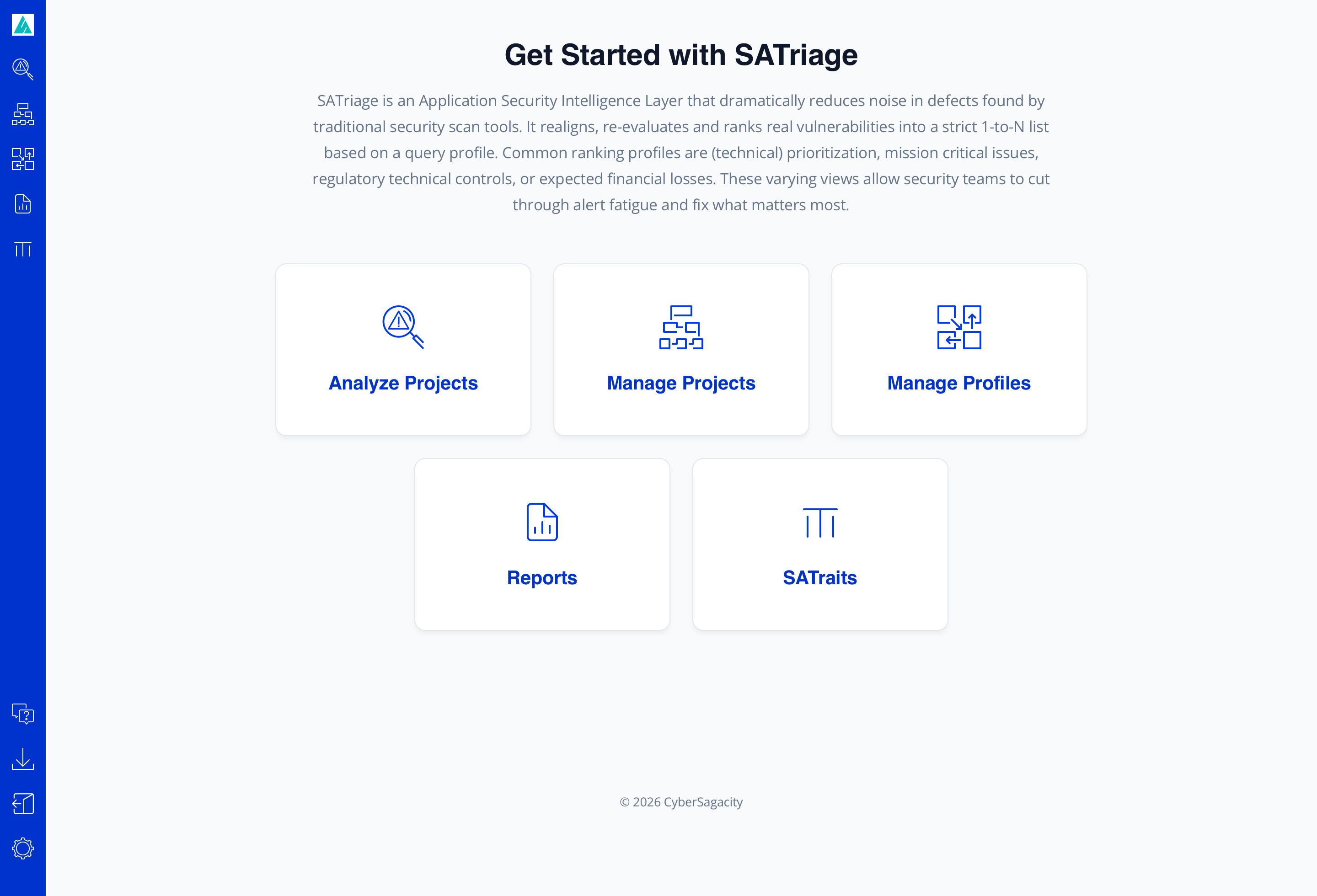
Once installation and initial configuration are complete, point your web browser to the host address and log in to the application. Upon successful authentication, you will be presented with the Get Started landing page (get-started.html), which serves as your central navigation launchpad:
SaaS Cloud Service (satriage.com)
The fastest way to get started is by accessing the multi-tenant or dedicated SaaS instance directly at satriage.com. No infrastructure management or installation is required; log in to your tenant domain and immediately configure projects, profiles, and analytical pipelines.
Docker Container Image
For containerized intranets, Kubernetes environments, or private cloud VPCs, SATriage provides an official Docker image available through the Download page (/download). This standalone container encapsulates the web service, execution workers, and default configuration templates, simplifying automated deployments and CI/CD agent hosting.
x86 Ubuntu Installer
For dedicated bare-metal servers or standard virtual machine instances running on internal corporate networks or private cloud infrastructure, an x86 Ubuntu installer package is available for download on the Download page (/download). The installer provisions the runtime dependencies, registers system daemons, initializes AppState.xml, and prepares the Ubuntu 24.04.4 LTS system environment for immediate execution.
Define a Software Project
Use Manage Projects to create, modify, and delete a project definition. The interface is organized into a dual-pane workspace:
The table on the left lists all current software projects available to your account, including projects that other users have shared with you. Note that shared projects—projects not owned by your account—are read-only and cannot be edited. Selecting any project from this list populates the project details area on the right, allowing you to edit its parameters or delete the project if you are the owner.
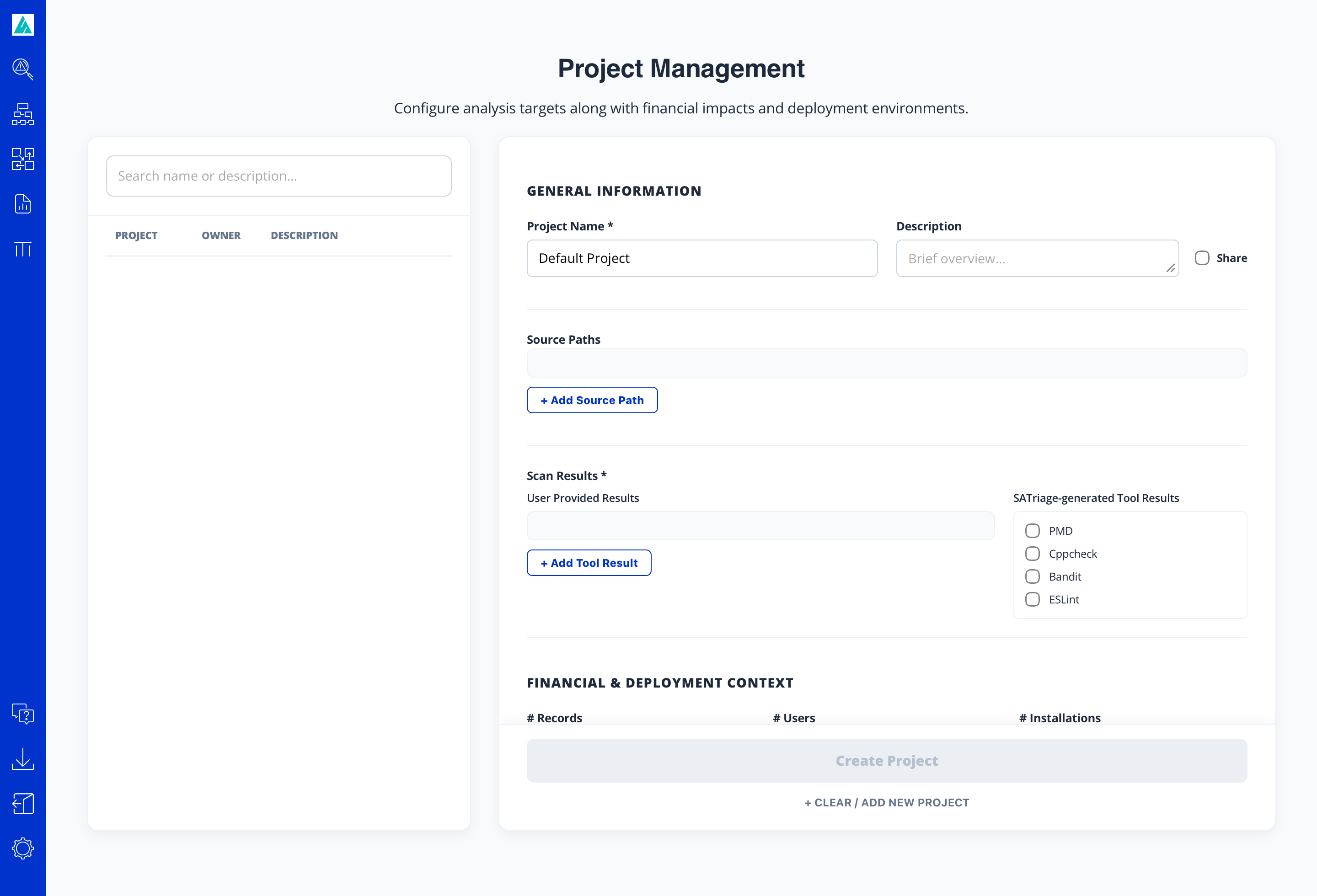
The project details pane contains the following configuration fields:
- Project Name: A descriptive identifier for the project. Each project must have a strictly unique name across the whole organization.
- Share: A checkbox indicating team visibility. When selected, the project is shared with all other users across the organization as a read-only resource.
- Source Paths: Specifies where SATriage finds the source code. This can be an absolute path to a local directory on the SATriage server (common when running SATriage on an enterprise intranet host or a local workstation), or a direct URL to a Git repository (for example,
https://github.com/kleemedia/zlib.git). Token-authenticated Git repositories are also supported using the syntaxhttps://<yourToken>@github.com/<owner>/<repoName>.git. - Scan Results: Defines where your defect data originates. You can upload existing results from external scanners via the User Provided Results column, or you can select one or more built-in scanners from the SATriage-generated Tool Results column and SATriage will run those scanners when you request it. For detailed instructions on executing built-in scanners, refer to the Perform Analysis section.
- FINANCIAL & DEPLOYMENT CONTEXT: Provides essential risk-modeling context for the project. Use these settings to estimate the deployment characteristics (e.g., internal vs. public exposure, data sensitivity) and the specific type of software represented by the project.
Create a Profile
Navigate to Manage Profiles to define an assessment query profile. Just like the Projects screen, this page is divided into a dual-pane workspace: a table on the left listing all existing profiles (including read-only profiles shared by other users), and a profile details area on the right where you can configure or update profile parameters.
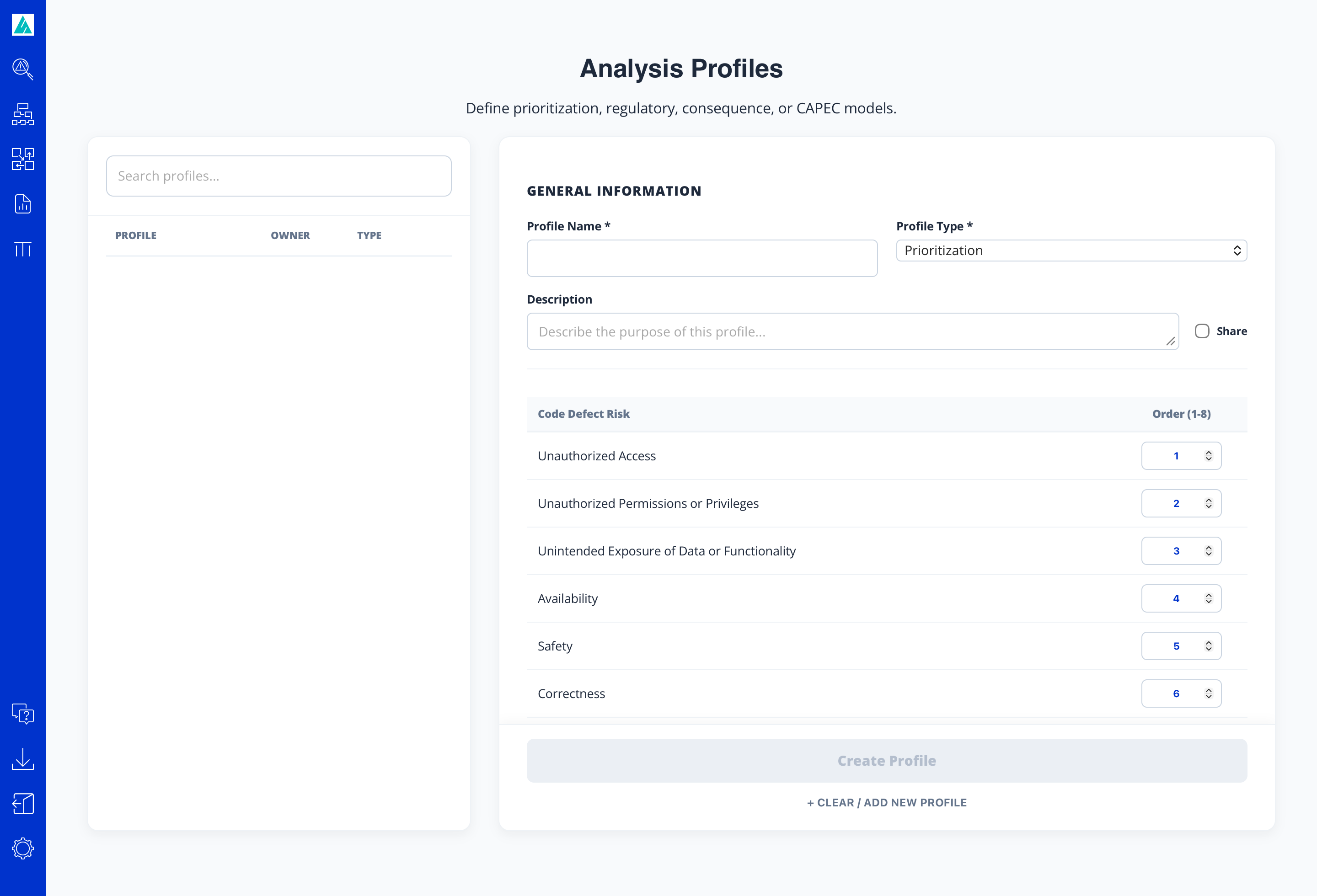
The primary profile configuration fields include:
- Name: A unique descriptive title for the profile. Like project names, profile names must be strictly unique across the entire organization.
- Profile Type: Specifies the analytical framework used to evaluate findings. The most basic and default option is the Prioritization profile.
- Share: A checkbox that, when selected, shares the profile across the organization for all users to utilize in their analyses.
The additional fields that appear in the details pane depend directly on the chosen profile type. For the default Prioritization profile type, the following Code Defect Risk categories are displayed, and you simply assign an integer order from 1 to 8 to prioritize each risk domain relative to the others:
- Unauthorized Access: Violations of authentication and entry control barriers.
- Unauthorized Permissions or Privileges: Flaws permitting privilege escalation or inappropriate authorization grants.
- Unintended Exposure of Data or Functionality: Leakage of sensitive operational data, API handles, or internal business logic.
- Availability: Defects leading to resource exhaustion, denial of service, or application instability.
- Safety: Critical structural risks impacting program execution integrity.
- Correctness: Functional flaws and computational errors causing invalid application state.
- Performance: Inefficiencies, memory overhead, and unoptimized resource usage.
- Convention and Style: Deviations from established coding standards and lint guidelines.
Perform Analysis
Navigate to Analyze Projects. Select your target Project from the left panel and your evaluation Profile from the right panel:
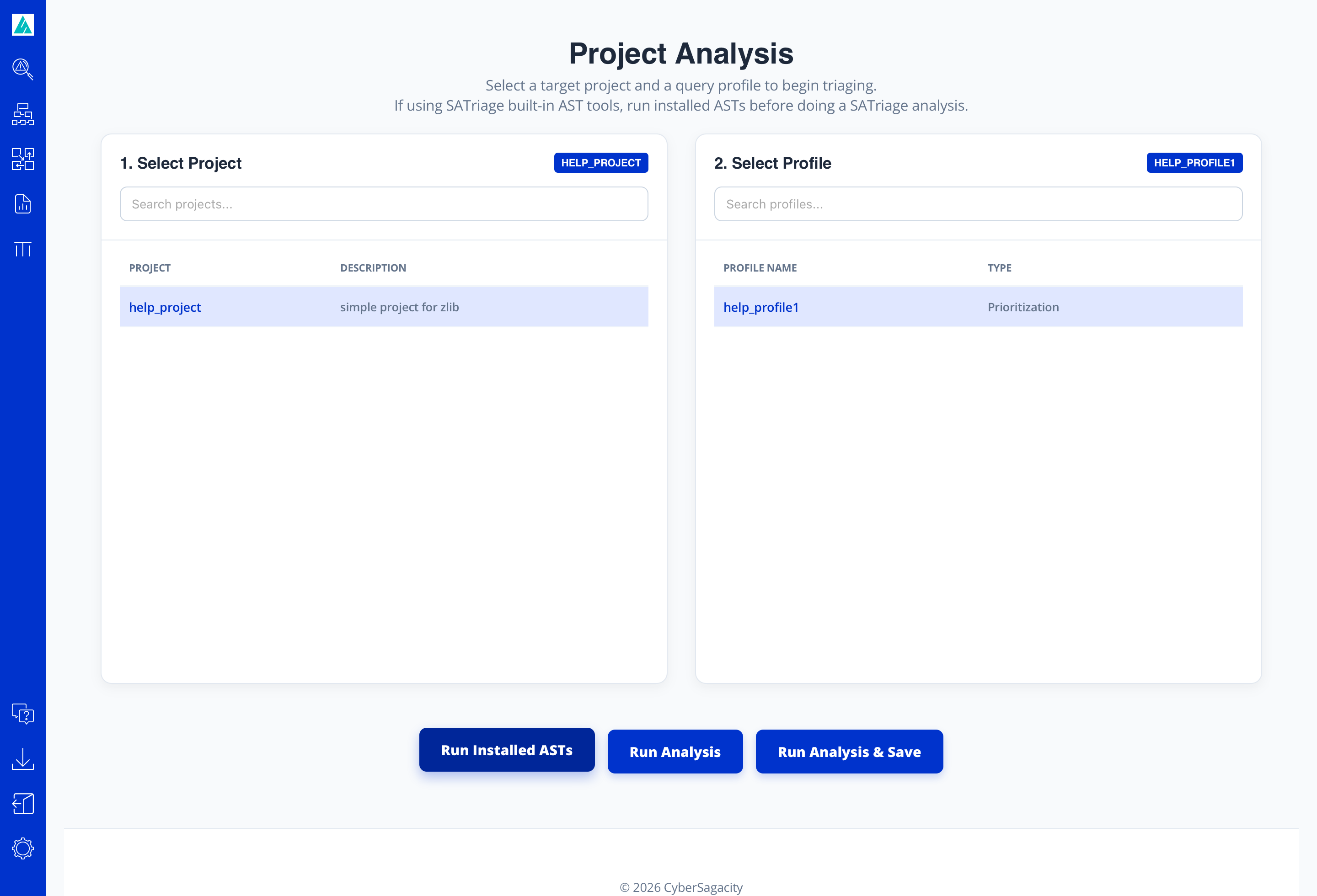
Beneath the project and profile selection panes, three primary action buttons drive the analysis workflow:
-
Run Installed ASTs: Instructs SATriage to execute the built-in AST scanners selected in your project definition against the specified codebase. If your project source is configured as a Git repository, SATriage automatically executes the necessary
git cloneorgit pullcommand to fetch an up-to-date copy prior to scanning. Because running multiple scanners across large projects takes time, execution proceeds asynchronously in the background; SATriage will send an automated notification email to your registered address once all tools finish scanning. -
Run Analysis: Executes the core SATriage triage engine without persisting results to the database. This operation pulls in all uploaded scanner results from the project definition alongside any outputs produced by the "Run Installed ASTs" step. SATriage normalizes, dedupes, and correlates these findings against your chosen profile, presenting the unified Results Page.
The live Results Page contains top-level summary cards (Defects by AST and Defects by Severity) and an Analysis view with two tabs: the default Defects tab (the 1-to-N ranked triage table) and the Financial Exposure tab (interactive cost and ROI charts).
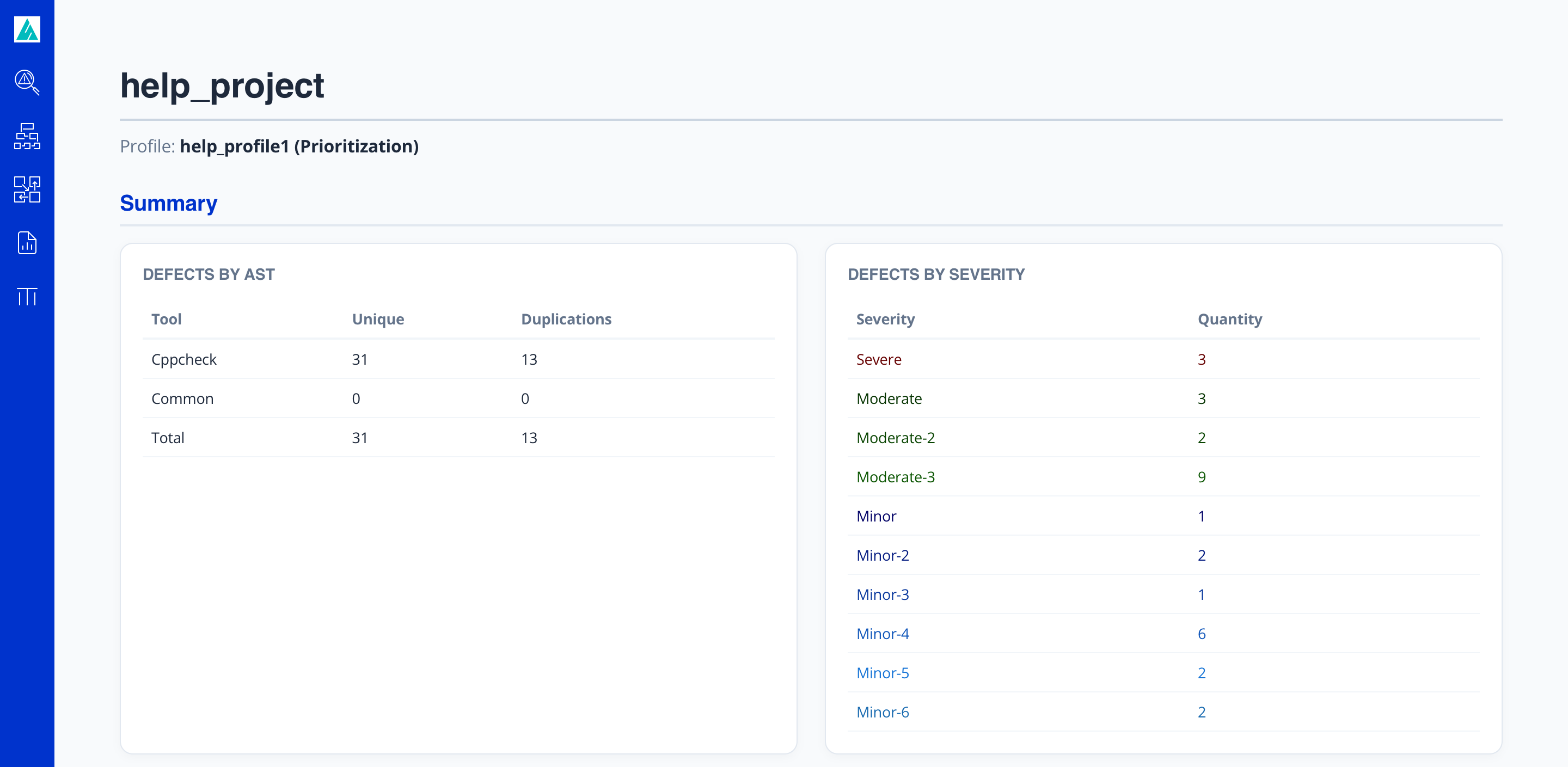
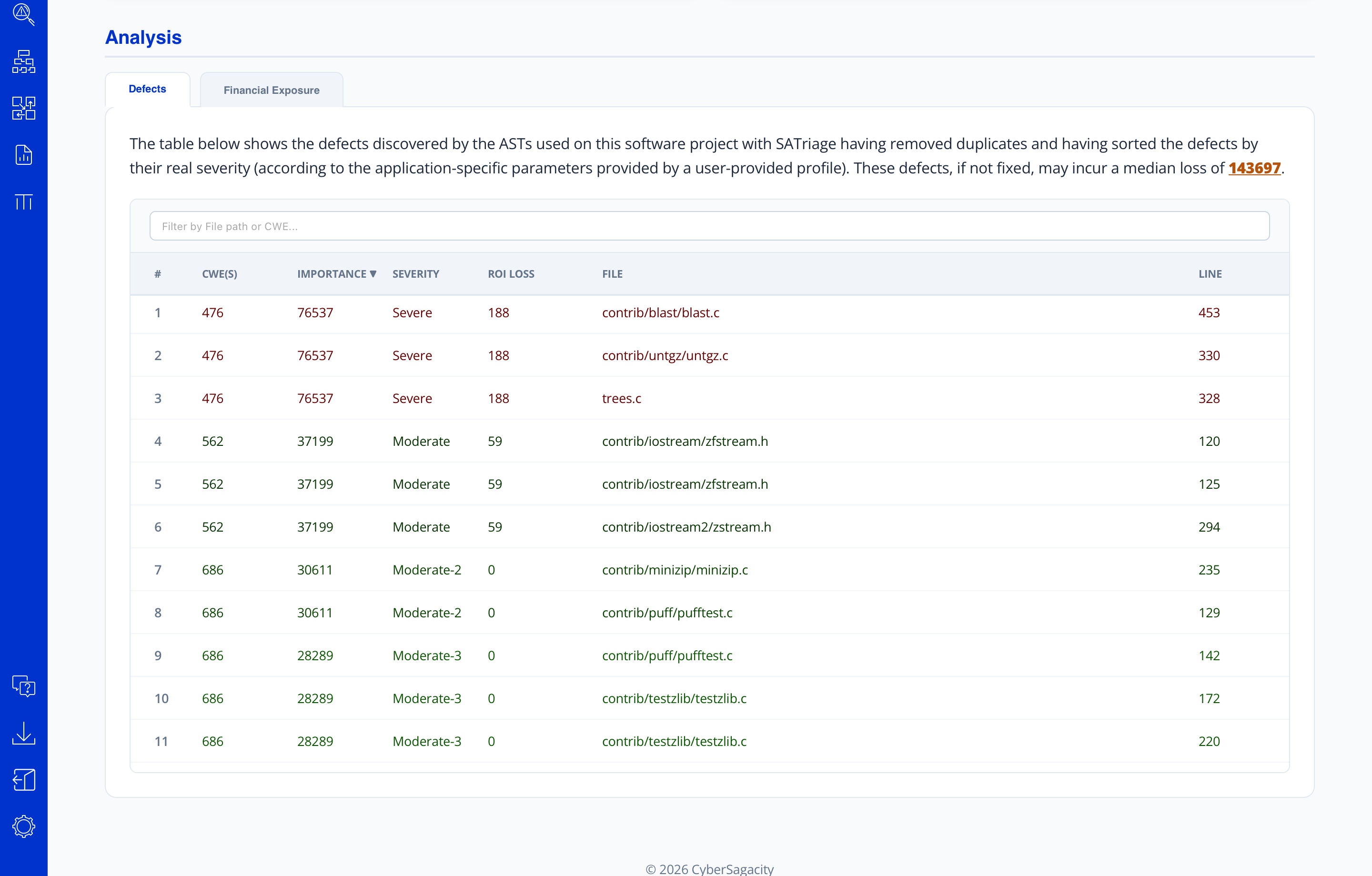 Figure: Scrollable view of the complete Results Page showing Summary metrics and the 1-to-N Defects triage table.
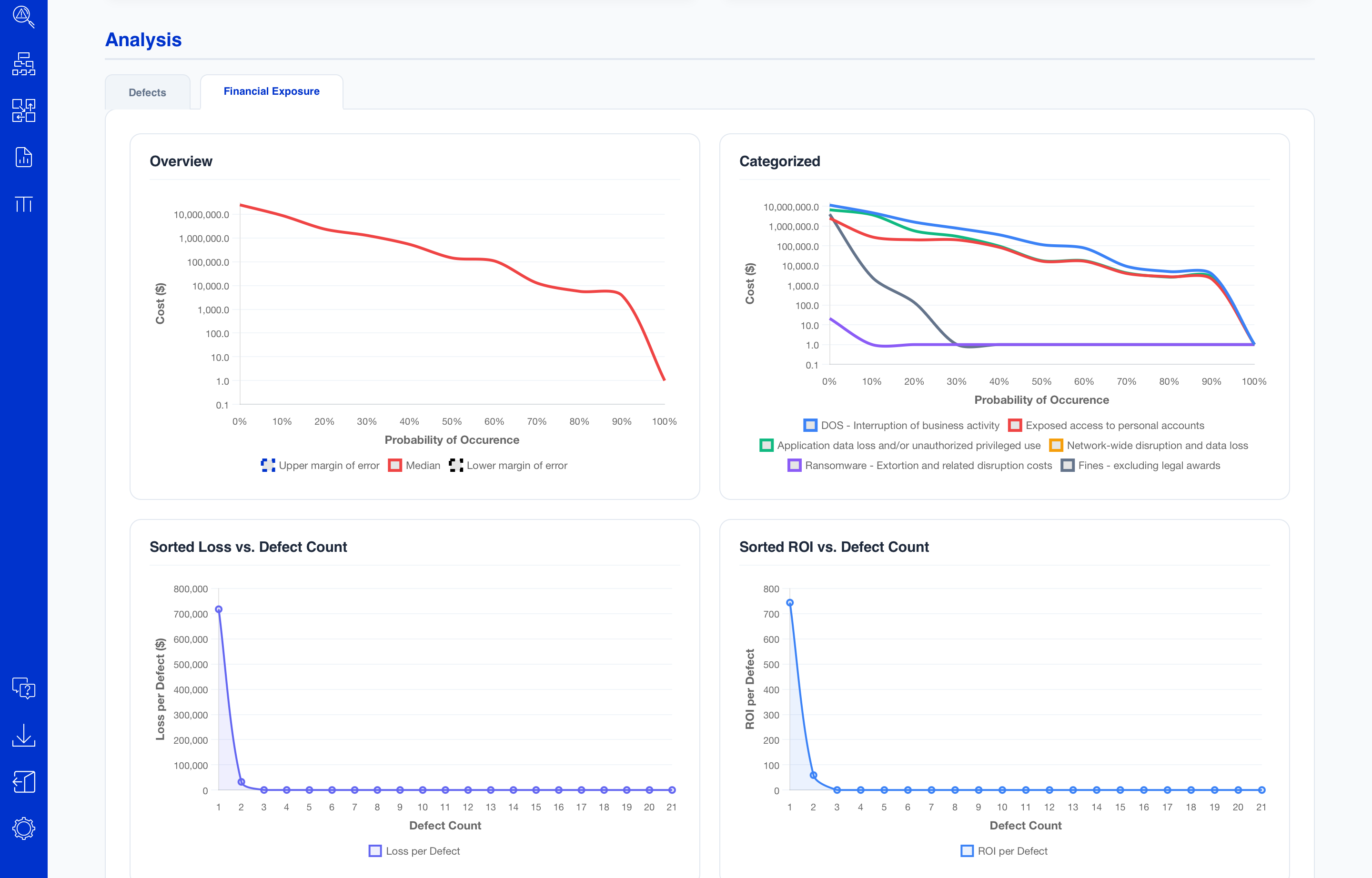 Figure: Scrollable view of the Results Page displaying the Financial Exposure charts and ROI projections.
Clicking on any defect row in the ranked triage table opens the Detailed Defect View. This is a single, continuous page showing the source code snippet with the specific vulnerability line highlighted at the top, and comprehensive Defect Detail & Risk Analysis sections (Risk Assessment, Accuracy Assessment, and Priority Assessment) directly below it:
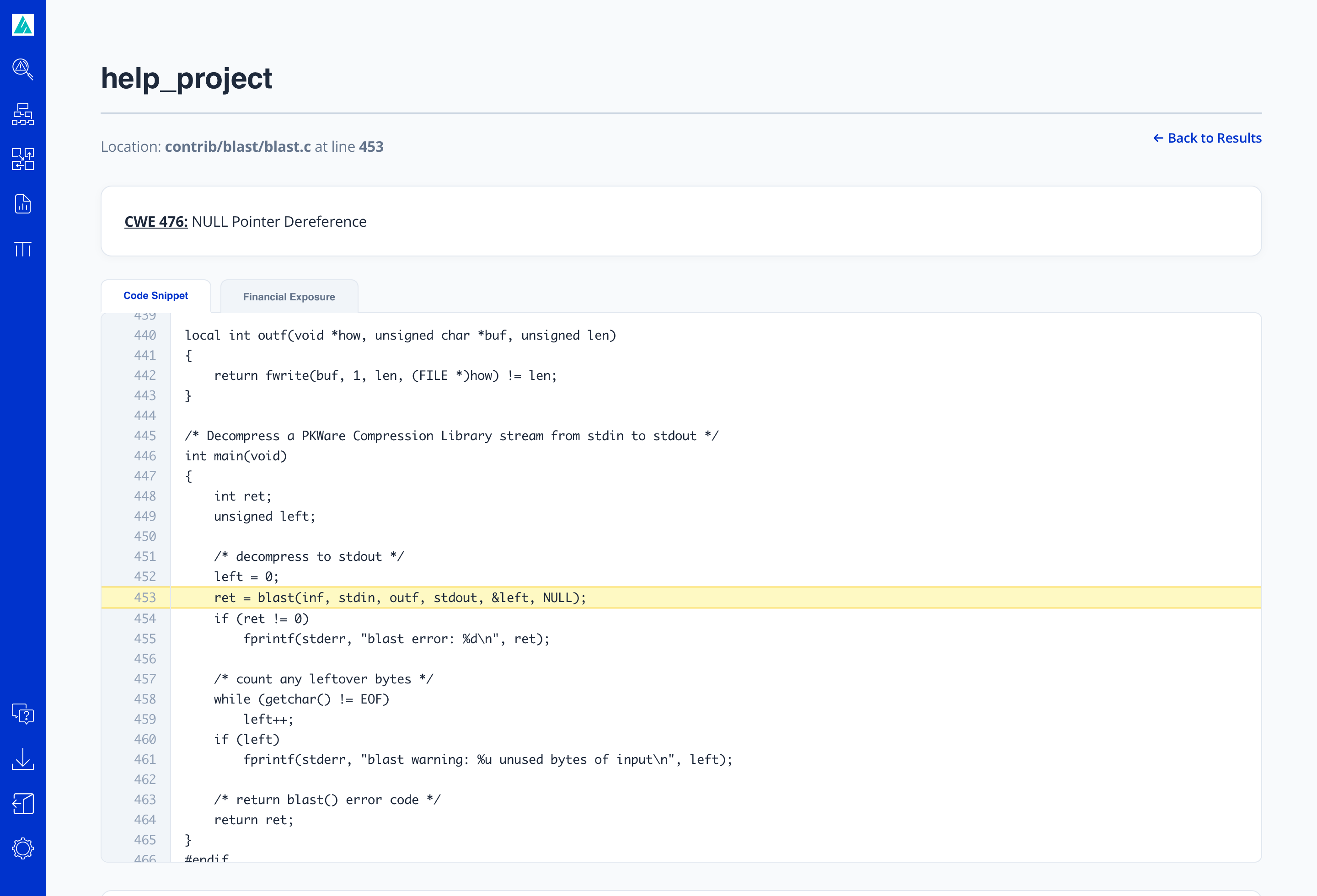
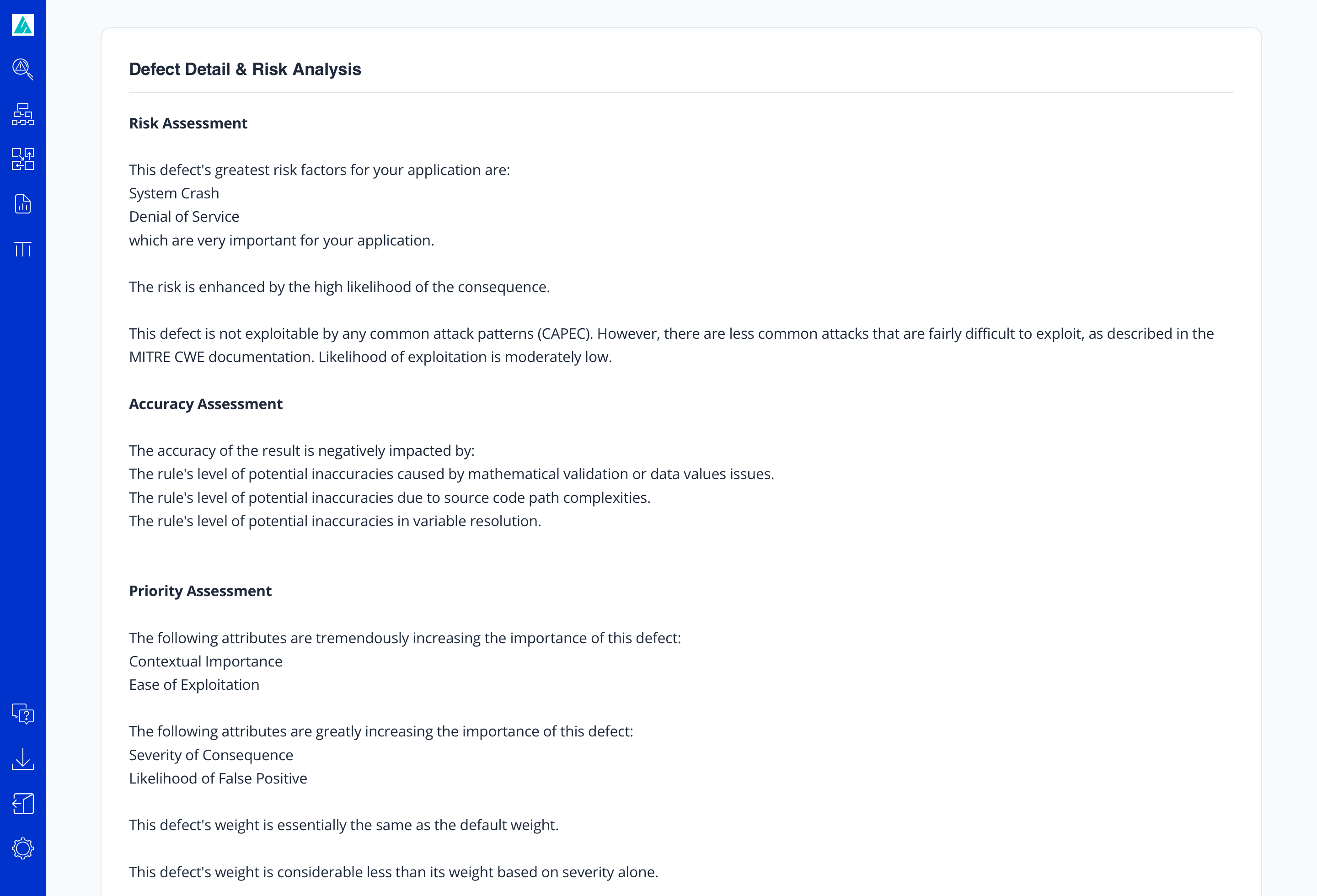 Figure: Scrollable view of the Detailed Defect View (highlighted code snippet and full Risk Analysis breakdown).
 - Run Analysis & Save: Performs the full SATriage analysis identically to "Run Analysis", while updating the cumulative project and organizational statistics required for the Management Reports with the results from this analysis run. Executing this option incorporates the current findings into the historical baseline, ensuring management metrics accurately reflect recent scans without permanently storing redundant, raw result sets.
Projects
The Project entity provides the environmental and situational context for all triage computations.
Project Creation & Data Sources
When setting up a project via /manageProjects, you register locations for:
- Source Code Repository: Base repository paths or archives used for line-of-code verification and language breakdown.
- AST Result Files: Outputs generated by one or more supported static, dynamic, or container security scanners.
Financial and Deployment Parameters
Technical defects do not exist in isolation; context determines risk. During project configuration, specify:
- Deployment Profile: Exposure levels (internal-only, partner-facing, or public internet-facing) and data classifications (PII, PCI, HIPAA, proprietary operational data).
- Financial Loss Baseline: Estimated cost per record breach, hourly downtime cost, and baseline SLA recovery expectations.
Managing Existing Projects
From the project dashboard, users can update scanner ingestion mappings, modify operational boundaries, re-index source files, or archive obsolete projects.
Profiles
Profiles establish your lenses for risk evaluation, dictating how findings are prioritized and sorted.
Profile Concepts & Defect Prioritization
A single project can be evaluated through multiple profile lenses depending on the stakeholder reviewing the data:
- Technical Prioritization: Focuses on exploitability, defect reliability, and technical severity.
- Mission-Critical / Safety: Prioritizes availability and logic integrity within core application execution paths.
- Regulatory Compliance: Elevates findings mapped directly to technical controls mandated by standards such as PCI-DSS or NIST.
- Financial Risk Mitigation: Emphasizes defects that represent the largest potential monetary exposure in the event of compromise.
Creating and Customizing Profiles
Create or tweak profiles via /manageProfiles. You can adjust category weights, promote specific Common Weakness Enumeration (CWE) categories, and set confidence thresholds to tune scanner noise suppression.
Analysis & Results
Triggering an Analysis Run
To run an analysis, open Analyze Projects (/analyzeProjects), select the target project definition, select the desired profile, and execute. The engine ingests all linked scan outputs, normalizes disparate vendor defect terminologies, strips false positives, and builds the evaluation graph.
Interpreting Ranked Results & Findings
Results are output in a deterministic 1-to-N ranked order. Each finding includes:
- Rank: Absolute remediation priority (Rank #1 requires earliest attention).
- Normalized Defect Class: Canonical defect identification across disparate vendor nomenclatures.
- Triage Rationale: The mathematical and contextual justification for the assigned rank based on project metadata and profile weights.
- Location: Normalized source file references and line numbers.
Management Reports
SATriage provides five distinct executive- and management-level reporting views accessible under /reports (governed by Manager or Administrator role permissions):
1. Cybersecurity Risk
Provides an overarching posture evaluation of the project or organization. It aggregates vulnerability density, exploit surface vectors, and remediation velocity into an actionable security posture scorecard.
2. Financial View
Translates technical flaws into monetary risk exposure based on configured financial parameters. Demonstrates the calculated potential loss exposure associated with open defects versus the return on investment (ROI) gained through proactive remediation.
3. Code View
Directs engineering and architectural leads to hotspots within application components. Identifies modules, repositories, or packages that account for a disproportionate volume of top-tier triage findings.
4. AppSec Tools
Evaluates the real-world utility of your active AST tool suite. Compares vendor coverage, noise-to-signal ratios, and identification of critical findings to help justify security tooling investments and license renewals.
5. Policy Guidance
Audits project compliance against defined organizational security baselines and industry regulatory standards. Identifies systemic recurring defects and recommends specific secure-coding guidelines and gate policies.
SATraits
Overview and Weighted Coverage
SATraits evaluates the relative coverage and effectiveness of AST tools against specific application contexts and programming languages. Extensive empirical research shows that distinct SAST/DAST tools exhibit less than 1% overlap in defect findings. Because 90% of findings flagged by two or more tools at the same line of code are distinct defects, multi-tool analysis is necessary to prevent false negatives.
Evaluating AST Tool Effectiveness
SATraits computes total weighted coverage across vendors by analyzing both the breadth and importance of defect detection rules, tempered by rule confidence (false-positive rate). Tools with extensive breadth but high false-positive rates receive penalized rankings, whereas tools with focused, highly accurate rules for critical defects score higher. Use the SATraits view (/inputLanguages) to determine which tool portfolio yields optimal coverage for your tech stack.
Administration & Settings
Administrative capabilities are accessed via Settings (/showSettings) and are governed by assigned user roles (such as Administrator or Manager).
Security
Provides core authentication controls. In the current release, this section is dedicated to credential updates and password (re)setting procedures for active user accounts.
Customer Profile Handling
Enables management of tenant metadata, enterprise license entitlement parameters, organization-wide defaults, and shared branding configurations.
User Management
Administrators can provision, deactivate, and modify user accounts. Access control is role-based; roles dictate access to functional areas, such as restricting Executive and Management Reports exclusively to users holding the Manager or Administrator role.
API Token Management
Allows generation, inspection, rotation, and revocation of programmatic API tokens used for CI/CD pipeline automation and headless scan-and-triage execution.
Manual Configuration via AppState.xml
All settings, integrations, customer profiles, and system definitions in SATriage are centralized within a single master configuration file: AppState.xml.
AppState.xml directly on the host file system. Modifications take effect upon configuration reload or daemon restart.
REST Interface
The SATriage REST API exposes endpoints covering projects, profiles, reports, and tools. All requests require authentication using API tokens (or valid user credentials) passed in query parameters or standard authorization headers.
Projects Endpoints
The /api/projects service enables programmatic CRUD operations, automated AST execution, and triage analysis for software projects:
Retrieves a list of all software projects accessible to the specified user, including owned and shared projects.
| Success Code | 200 OK |
|---|---|
| Response Header | Content-Type: application/json |
| Response Body | JSON array containing project objects. |
Retrieves complete configuration and context details for a single project by its unique identifier.
| Success Code | 200 OK |
|---|---|
| Response Header | Content-Type: application/json |
| Response Body | JSON object representing the requested project definition. |
Provisions a new software project definition. Append share=true to immediately grant read access across the organization.
| Success Code | 201 Created |
|---|---|
| Request Body | JSON object containing the project definition, source repositories, and deployment parameters. |
| Response Header | Content-Type: application/json |
| Response Body | Created project JSON object, including its assigned unique id. |
Updates an existing software project. Only the project owner or administrators can update definitions.
| Success Code | 201 Created |
|---|---|
| Request Body | JSON object containing updated project fields. |
| Response Header | Content-Type: application/json |
Permanently removes a project definition and unlinks its associated scan metadata.
| Success Code | 200 OK |
|---|---|
| Response Header | Content-Type: application/json |
Executes an immediate triage analysis against the specified project using the supplied evaluation profile.
| Query Parameters |
profile (required): Evaluation profile identifier.detail (optional): Level of defect verbosity (full or brief).maxResults (optional): Caps the output to the top N ranked findings.saveResults (optional): Set to true to incorporate metrics into Management Reports.
|
|---|---|
| Success Code | 201 Created |
| Response Header | Content-Type: application/json |
| Response Body | SARIF-formatted JSON object containing the assigned analysis identifier, result expiration window, and the 1-to-N ranked defect findings. |
Triggers asynchronous batch analysis across all registered software projects and updates cumulative statistics. Returns immediately upon queue registration.
| Success Code | 202 Accepted |
|---|---|
| Response Header | Content-Type: application/json |
Queues execution of all built-in AST tools configured for the project (pulling fresh Git code when applicable). Operates asynchronously.
| Success Code | 202 Accepted |
|---|---|
| Response Header | Content-Type: application/json |
Profiles Endpoints
The /api/profiles service manages analytical queries and prioritization profiles used to weight defect findings during analysis:
Retrieves a list of all query profiles defined for the tenant organization, including default system profiles and custom shared profiles.
| Success Code | 200 OK |
|---|---|
| Response Header | Content-Type: application/json |
| Response Body | JSON array containing profile objects. |
Retrieves the complete definition, configuration parameters, and risk weight rankings for a single profile by its unique identifier.
| Success Code | 200 OK |
|---|---|
| Response Header | Content-Type: application/json |
| Response Body | JSON object representing the requested profile. |
Provisions a new evaluation profile with custom defect risk ordering or weighting rules.
| Success Code | 201 Created |
|---|---|
| Request Body | JSON object containing the profile definition (Name, Profile Type, Share flag, and Code Defect Risk order mappings). |
| Response Header | Content-Type: application/json |
| Response Body | Created profile JSON object, including its assigned unique id. |
Updates an existing evaluation profile. Replaces or amends risk categories, ordering, and metadata.
| Success Code | 201 Created |
|---|---|
| Request Body | JSON object containing updated profile parameters. |
| Response Header | Content-Type: application/json |
Permanently deletes a specified evaluation profile from the organization's repository.
| Success Code | 200 OK |
|---|---|
| Response Header | Content-Type: application/json |
Reports Endpoints
The /api/reports service enables programmatic discovery and generation of executive and management reports:
Retrieves a list of all available management report identifiers configured within the system.
| Success Code | 200 OK |
|---|---|
| Response Header | Content-Type: application/json |
| Response Body | JSON array containing report ID string objects. |
Executes and compiles a specific management report by its identifier, returning the structured reporting output and aggregated metrics.
| Success Code | 201 Created |
|---|---|
| Response Header | Content-Type: application/json |
| Response Body | JSON object containing compiled report output and summary data. |
Tools Endpoints
The /api/tools service queries the security scanners installed and available for execution within the SATriage instance:
Retrieves a list of all available built-in AST scanning tools installed and ready to execute within this SATriage instance.
| Success Code | 200 OK |
|---|---|
| Response Header | Content-Type: application/json |
| Response Body | JSON array of tool names (for example, ["bandit", "PMD"]). |
Model Context Protocol (MCP) Interface
SATriage exposes a native Model Context Protocol (MCP) HTTP endpoint at /mcp. Operating as a JSON-RPC 2.0 gateway front-end to the underlying REST architecture, this endpoint enables AI engineering assistants and LLM agents (such as Claude Desktop, Cursor, and Aider) to inspect project definitions, execute static code scans, and ingest prioritized defect lists autonomously.
Protocol & Connection Details
| Endpoint URL | /mcp (HTTP POST only) |
|---|---|
| Protocol Version | 2024-11-05 (JSON-RPC 2.0) |
| Server Identifier | project-and-profile-management-mcp-server (v1.2.0) |
| Authentication |
Requires standard session authentication or programmatic token passed via header: SATriageToken: <API_TOKEN>. User identity (userId) is automatically resolved from the token context.
|
Sample Client Configuration
To connect an external MCP-compatible client (e.g., Claude Desktop, IDE extensions) to your SATriage instance, configure an HTTP MCP server entry in your client settings file:
{
  "mcpServers": {
    "satriage": {
      "url": "https://your-satriage-host/mcp",
      "headers": {
        "SATriageToken": "<YOUR_SATRIAGE_API_TOKEN>"
      }
    }
  }
}
Supported MCP Methods
initialize: Negotiates client capabilities, establishes protocol version2024-11-05, and reports server metadata.notifications/initialized: Acknowledges client readiness (returns HTTP 204 No Content).tools/list: Returns JSON Schema definitions for all available project and profile tools.tools/call: Executes a specific tool by forwarding parameters to the respective SATriage REST endpoint and returning the output as formatted content.
Available MCP Tools
The MCP handler exposes 12 discrete tools mapped directly to Project and Profile lifecycle workflows:
Lists all software projects accessible to the authenticated user.
| Arguments | None |
|---|---|
| Underlying REST Call | GET /api/projects?userId={user_id} |
Retrieves configuration details and metadata for a single project.
| Arguments | id (string, required): Project identifier. |
|---|---|
| Underlying REST Call | GET /api/projects/{id}?userId={user_id} |
Provisions a new software project definition.
| Arguments |
projectData (object, required): Full Project POJO payload.share (boolean, optional): Whether to share the project organization-wide.
|
|---|---|
| Underlying REST Call | POST /api/projects?userId={user_id}[&share=true] |
Updates an existing software project configuration.
| Arguments |
id (string, required): Project ID to update.projectData (object, required): Updated Project POJO schema.share (boolean, optional): Whether to share the project.
|
|---|---|
| Underlying REST Call | PUT /api/projects/{id}?userId={user_id}[&share=true] |
Deletes a specified software project definition.
| Arguments | id (string, required): Project identifier. |
|---|---|
| Underlying REST Call | DELETE /api/projects/{id}?userId={user_id} |
Runs SARIF static triage analysis on a single project using a designated analysis profile ID.
| Arguments |
id (string, required): Project ID.profile (string, required): Target profile identifier (use list_profiles to discover).detail (string, optional, enum: ["brief", "full"], default: "brief"): Verbosity of defect output. Note: Always prefer brief (~2.7MB) to prevent context window overflow; full (~27MB) can exceed token limits.maxResults (integer, optional): Maximum defect results to return in SARIF output.saveResults (boolean, optional): Updates cumulative baseline statistics for Management Reports.
|
|---|---|
| Underlying REST Call | GET /api/projects/{id}/analyze?userId={user_id}&profile={profile_id}... |
Triggers asynchronous static analysis across all projects in the background. Returns an HTTP 202 Accepted confirmation indicating the job was queued.
| Arguments |
profile (string, required): Analysis Profile ID.maxResults (integer, optional): Maximum results per project.
|
|---|---|
| Underlying REST Call | POST /api/projects/analyze?userId={user_id}&profile={profile_id} |
Lists all static analysis profiles available for the authenticated user.
| Arguments | None |
|---|---|
| Underlying REST Call | GET /api/profiles?userId={user_id} |
Retrieves configuration details and weighting rules for a single profile.
| Arguments | id (string, required): Profile identifier. |
|---|---|
| Underlying REST Call | GET /api/profiles/{id}?userId={user_id} |
Creates a new static analysis query profile.
| Arguments | profileData (object, required): Full Profile POJO payload. |
|---|---|
| Underlying REST Call | POST /api/profiles?userId={user_id} |
Updates an existing static analysis profile.
| Arguments |
id (string, required): Profile ID to update.profileData (object, required): Updated Profile POJO payload.
|
|---|---|
| Underlying REST Call | PUT /api/profiles/{id}?userId={user_id} |
Deletes a single analysis profile by ID.
| Arguments | id (string, required): Profile identifier. |
|---|---|
| Underlying REST Call | DELETE /api/profiles/{id}?userId={user_id} |